Legal practice management software that works the matter
Every matter, every date and every client in one system, with a dashboard over the whole practice and an assistant that has already read the file. Firm accounts, time tracking and invoicing are being built on top of it now. No seat minimum, nothing to install.
What is legal practice management software?
Legal practice management software is the system a firm runs its business on — every matter, every date and every client in one place, instead of an inbox, a shared drive and three calendars. These five modules are live today. The sixth the category is judged on — time tracking and billing — is being built now.
Matters
Every case the practice holds, as a typed record rather than a folder name — status, priority, case number, matter type, court, client and opposing counsel, opened and closed.
Docket and calendar
Every date the practice owes, across every matter — filings, hearings, notice periods — plus standalone tasks that belong to a person rather than a case. Overdue sorts first.
Clients and conflicts
Who the practice acts for and against, with a typed role on every name — and a check that compares a new matter's parties against every other matter on your books.
Documents
The practice's file library, filed by matter — including drafts written in the assistant and saved straight into the case rather than downloaded and re-uploaded.
Reporting
The numbers most solos only ever estimate — how the deadline load falls over the coming weeks, what the case mix is made of, and which matters have gone quiet.
Everything a matter needs, in one place
The matter, the dates, the parties, the documents and the drafting all live in the same place — and the assistant can reach every one of them. No exporting, no re-uploading, no tab you forgot was open.
Matter workspace
One record per case, everything attached to it
Deadlines and docket
Overdue sorts first, everywhere it appears
Parties and conflicts
Checked against every matter you hold
Document library
Drafts save straight into the case
Practice dashboard
Deadline load, case mix, stale matters
Daily deadline digest
Your hour, your timezone, your language
Calendar export
.ics with reminder alarms built in
AI inside the matter
Reads the file and acts on it
This page is the view across your practice
Open one matter and there is a whole workspace behind it — six tabs, a full audit trail, and an assistant that can read the file and write back to it.
Every matter you hold, on one screen
A practice list is for narrowing, not scrolling. Status tabs carry live counts and search covers the whole matter record — not just the title.
- Search across title, case number, matter type, client, court, opposing counsel and tags
- Filter by priority and tag; group by status, priority, type or client
- Each row shows its next deadline and flags anything already overdue
- Applied filters show as removable chips, so a narrowed list never reads as empty
- Status tabs carry live counts, so you can see the shape of the practice at a glance

The dates that end careers, in one place
One grid over every matter the practice holds. Deadlines can belong to a case or to you — standalone tasks have no matter attached, so the things that keep a practice running don't have to be filed under a client to exist.
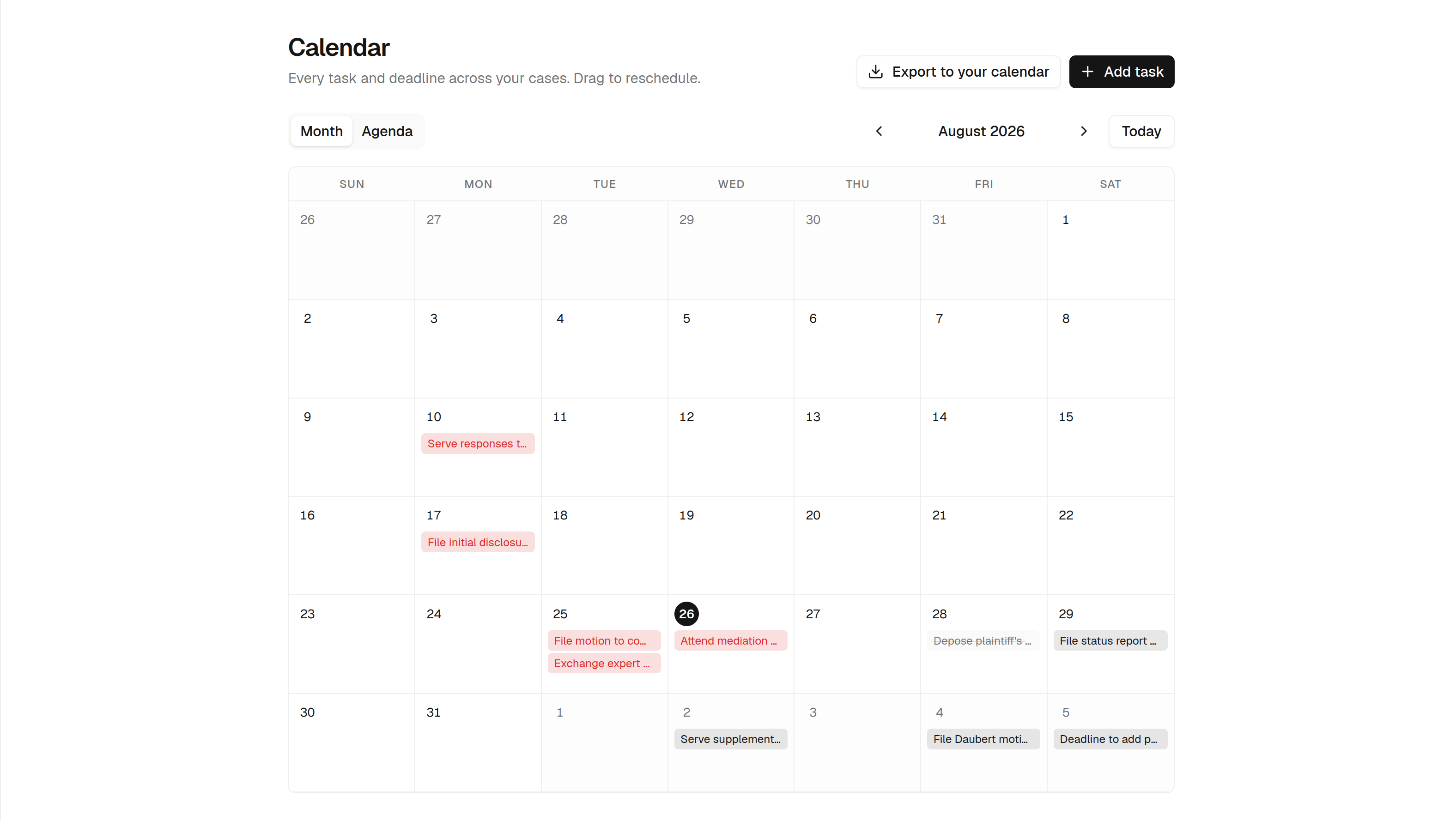
Overdue sorts first
A missed filing matters more than next month's hearing, so nothing ever skips past an overdue item to show you a tidier future date.
Drag to reschedule
The month grid moves a date by dragging it. The agenda view lists the same dates in order when a grid is the wrong shape for the question.
One digest a day
An email listing what is overdue, due today and coming up — at your hour, in your timezone and language. Opt-in and off by default.
Export to your calendar
Pending deadlines download as an .ics file with reminder alarms included, so they can also live in Outlook or Google Calendar.
The view above the matters
A matter list tells you what exists. A dashboard tells you whether the practice is in trouble — how the deadline load falls, what the case mix looks like, and which matters have gone quiet.
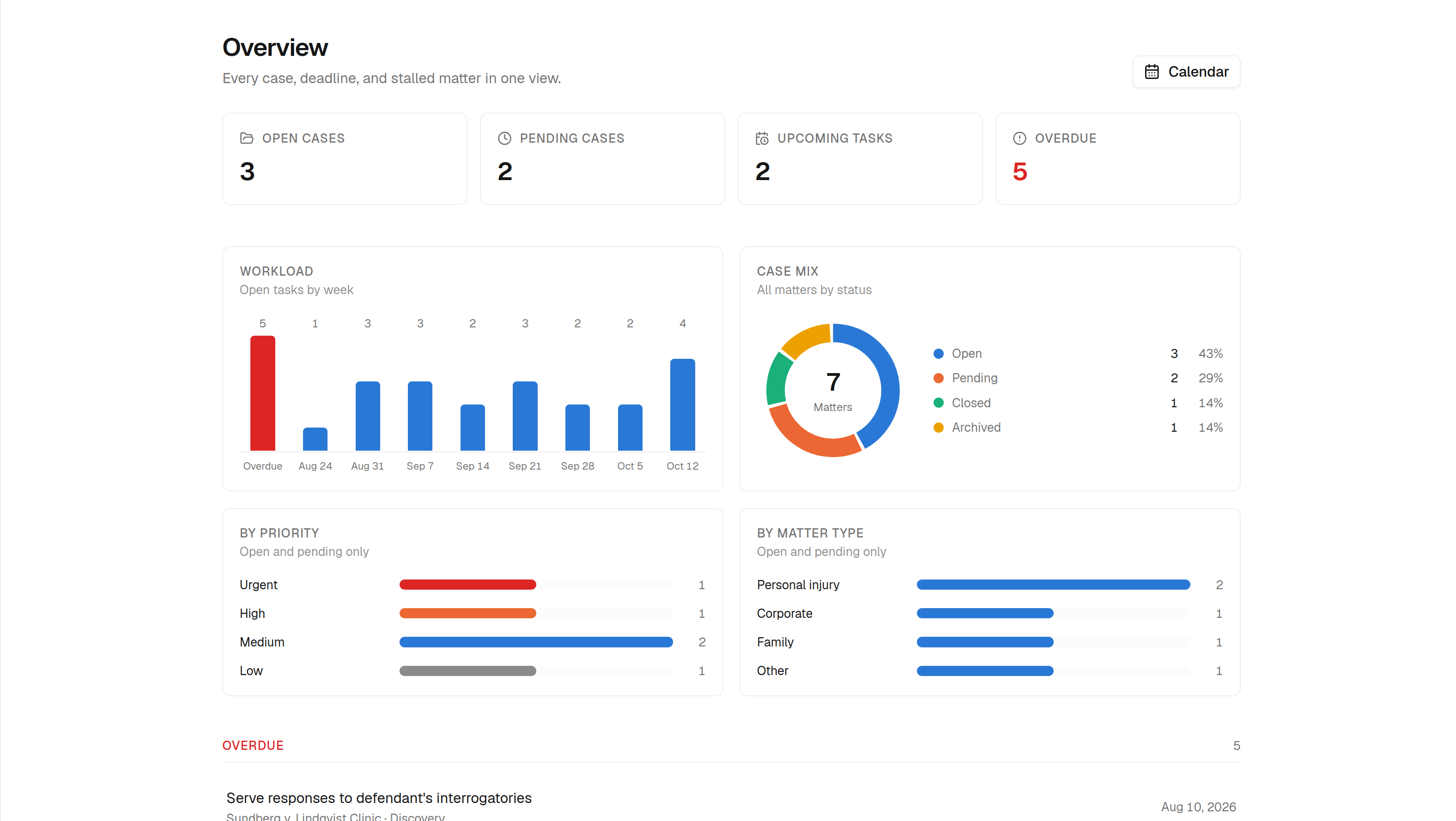
Deadline load
Where the pressure actually falls over the coming weeks, so you can see a bad Thursday a month out instead of the morning it arrives.
Case mix
What the practice is actually made of, by matter type and by status — the number most solos only ever estimate.
Stale matters
Open matters nothing has been recorded against in weeks. The ones that turn into a complaint are almost always on this list first.
What your week looks like after
Most solo practices are not running bad software — they are running no software, spread across an inbox, a shared drive and a calendar that does not know a filing deadline from a lunch. This is what changes.
Find where a matter stands
Know what is due
Run a conflict check
Get the AI to help
See how the practice is doing
Add a lawyer or a laptop
The rest of the practice, shipping soon
Everything above this line is live today. These three are in active development — the back-office half of practice management, built on the same matters you are already working in. They arrive on the plan you are already paying for, with no migration and no upgrade.
One firm, many lawyers, one set of matters
Matters stop belonging to one login. Invite the firm, give everyone a role, and assign work — while the conflict check finally sees every matter the firm holds rather than every matter you personally opened.
- Invite colleagues by email and give each a role — partner, associate, paralegal
- Assign a matter, or a single task on it, to someone else in the firm
- A firm-wide view of the docket, not just your own slice of it
- Conflict checks widen to the whole firm's book of business
- Per-matter access, so a paralegal sees the files they work on
Capture the hour while you work it
A timer that starts on the matter you already have open, so time is recorded where the work happens instead of reconstructed from memory on a Friday afternoon.
- Start and stop a timer against the open matter in one click
- Add entries by hand after the fact, with the matter pre-filled
- Rates per matter, per client or per person
- A daily and weekly total that shows what was actually billable
- Every entry lands on the matter, so it is there when the invoice is drawn
An invoice built from the work you already logged
Draw an invoice straight from the matter's time entries. No re-keying, no spreadsheet in between, and no month-end reconstruction of what you did three weeks ago.
- Generate a draft invoice from a matter's unbilled time
- Edit lines, add fixed fees and disbursements before it goes out
- Send it to the client and track sent, viewed, paid and overdue
- Outstanding balance per client and per matter on the dashboard
- Export for your accountant, so bookkeeping stays where it already is
These three are in development and not yet in the product. Everything else on this page is live today and works on the free trial — start on the matter side now, and the back office arrives on the plan you are already on. Talk to us about early access.
Practice management is on the Business plan
Everything else — unlimited Q&A, document review, drafting — is available lower down. The matter workspace, the calendar, the dashboard and the deadline digest need Business. One price, no seat minimum, and no per-user maths as you grow.
Free
Try the assistant on your own questions.
Free forever. No card required.
- 3 legal questions per day
- File uploads up to 1MB (3 per message)
- Case law search access
Starter
Unlimited Q&A for a solo practitioner.
- Unlimited legal Q&A
- 5 deep reasoning requests/day
- 10 document reviews/month
- 10 document generations/month
- File uploads up to 10MB (5 per message)
- Case law search access
- Email support
Pro
For a steady document load.
- Everything in Starter
- 15 deep reasoning requests/day
- 50 document reviews/month
- 50 document generations/month
- File uploads up to 25MB (10 per message)
- Priority email support
Business
The plan that runs your matters.
- Everything in Pro
- Cases: shared chats, documents & matter context
- 30 deep reasoning requests/day
- Unlimited document reviews
- Unlimited document generations
- File uploads up to 50MB, unlimited attachments
- Real-time web search
- Dedicated live chat support
Cancel anytime. Secure payment byDodo Payments