Legal case management software that has already read the file
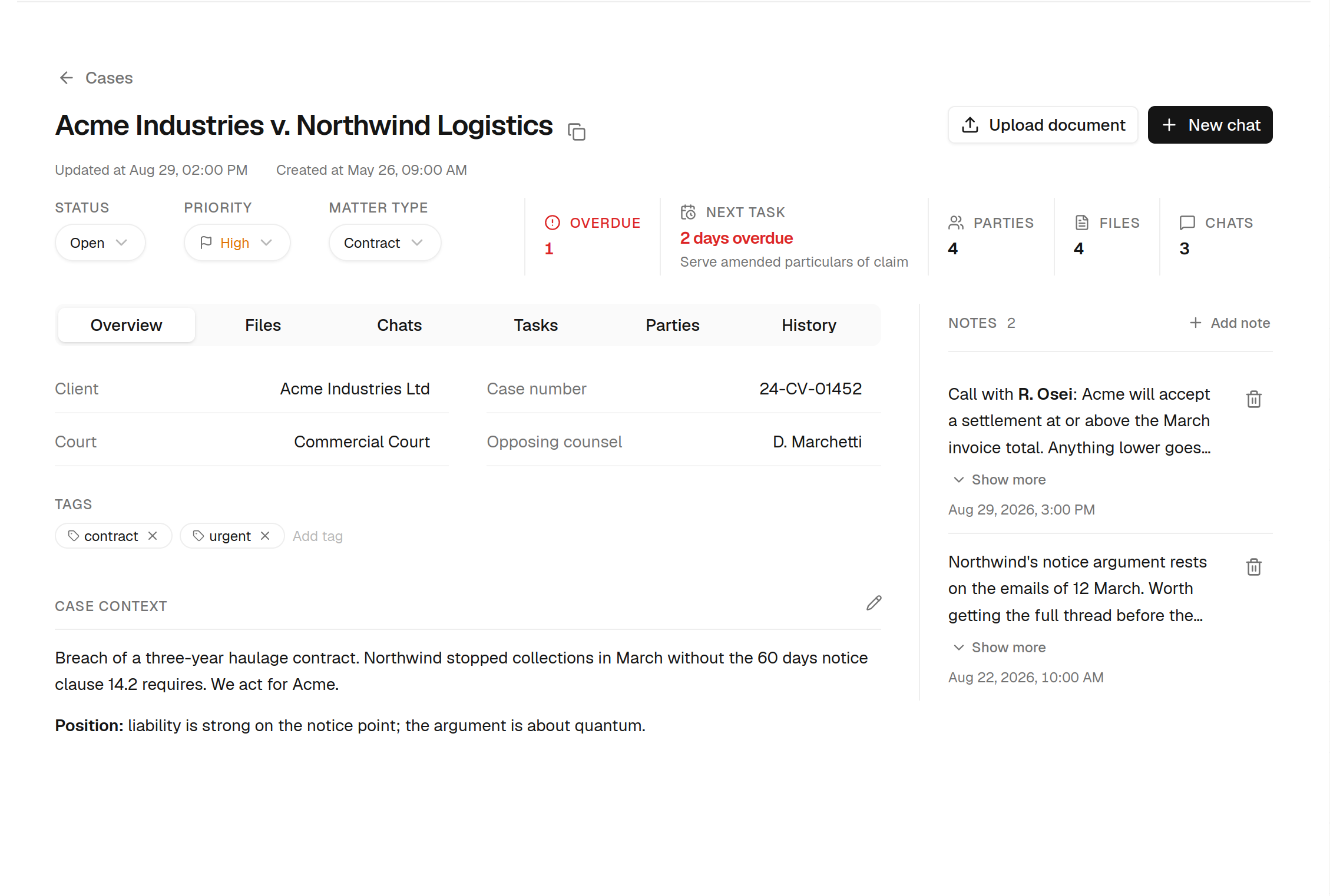
Open a case and everything about it is behind six tabs — deadlines, parties, documents, notes, chats and an audit trail that cannot be edited. The difference from the rest of the category is what sits inside it: an assistant that can read the whole matter and act on it, filing a deadline or saving a draft into the case without you leaving the conversation.
What is legal case management software?
Legal case management software is the system of record for a law practice’s matters — one container per case for deadlines, parties, documents, notes and history, instead of an inbox, a shared drive and a calendar.
Opened Jan 12 · Northwind Logistics
The matter record
Status, priority, tags, case number, matter type, court, client, opposing counsel, and the dates the matter opened and closed.
Deadlines and tasks
Everything with a date attached — filings, hearings, notice periods — plus standalone tasks that belong to you rather than to any one matter.
Parties
Clients, opposing counsel, opposing parties, judges, witnesses and experts, each with a typed role rather than a free-text label.
Documents
The matter's file library, including drafts written in the assistant and saved straight into the case.
Notes and context
Working notes in markdown, plus a standing background for the matter that the assistant reads on every question you ask inside it.
History
An append-only record of what changed and when — status moves, new parties, filed deadlines, uploaded documents.
One matter, six tabs, nothing else to open
Open a case and everything about it is behind six tabs — no hunting through an inbox, a drive and a calendar to reconstruct where things stand.
The dates on this file
Open the Tasks tab and you are looking at one matter's dates only — what is late, what is next, and what kind of deadline each one actually is.
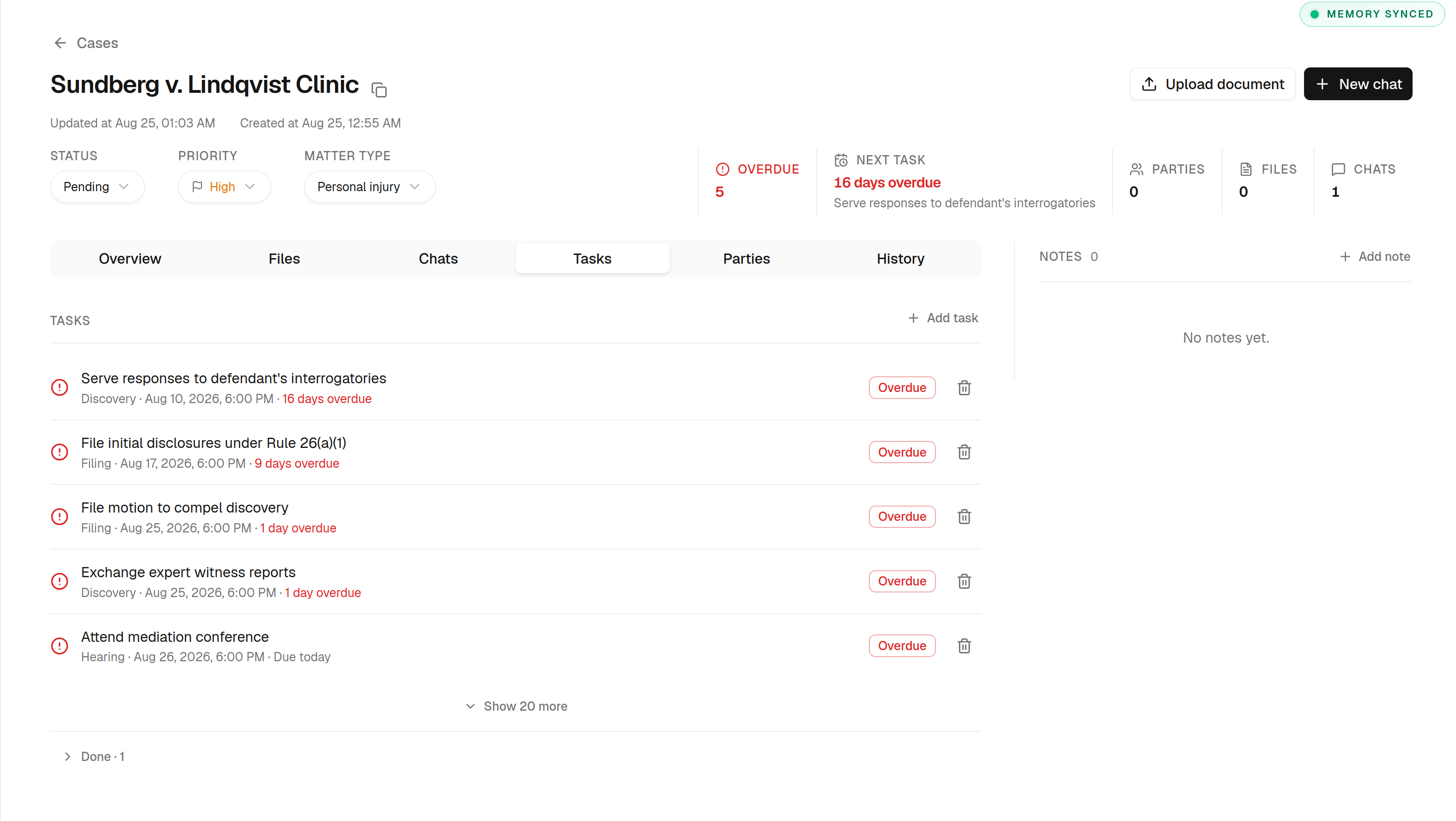
Overdue sorts first
A missed filing matters more than next month's hearing, so the matter never skips past an overdue item to show you a tidier future date.
Typed, not free text
Every task carries a kind — filing, discovery, hearing — so the record says what the date actually is rather than leaving it in the title.
Standalone tasks
A task can belong to you rather than to the matter, so the things that keep a case moving don't have to be filed under a deadline to exist.
Done, not deleted
Completing a task keeps it on the matter and writes it to the history, so the record of what was done survives the tidying up.
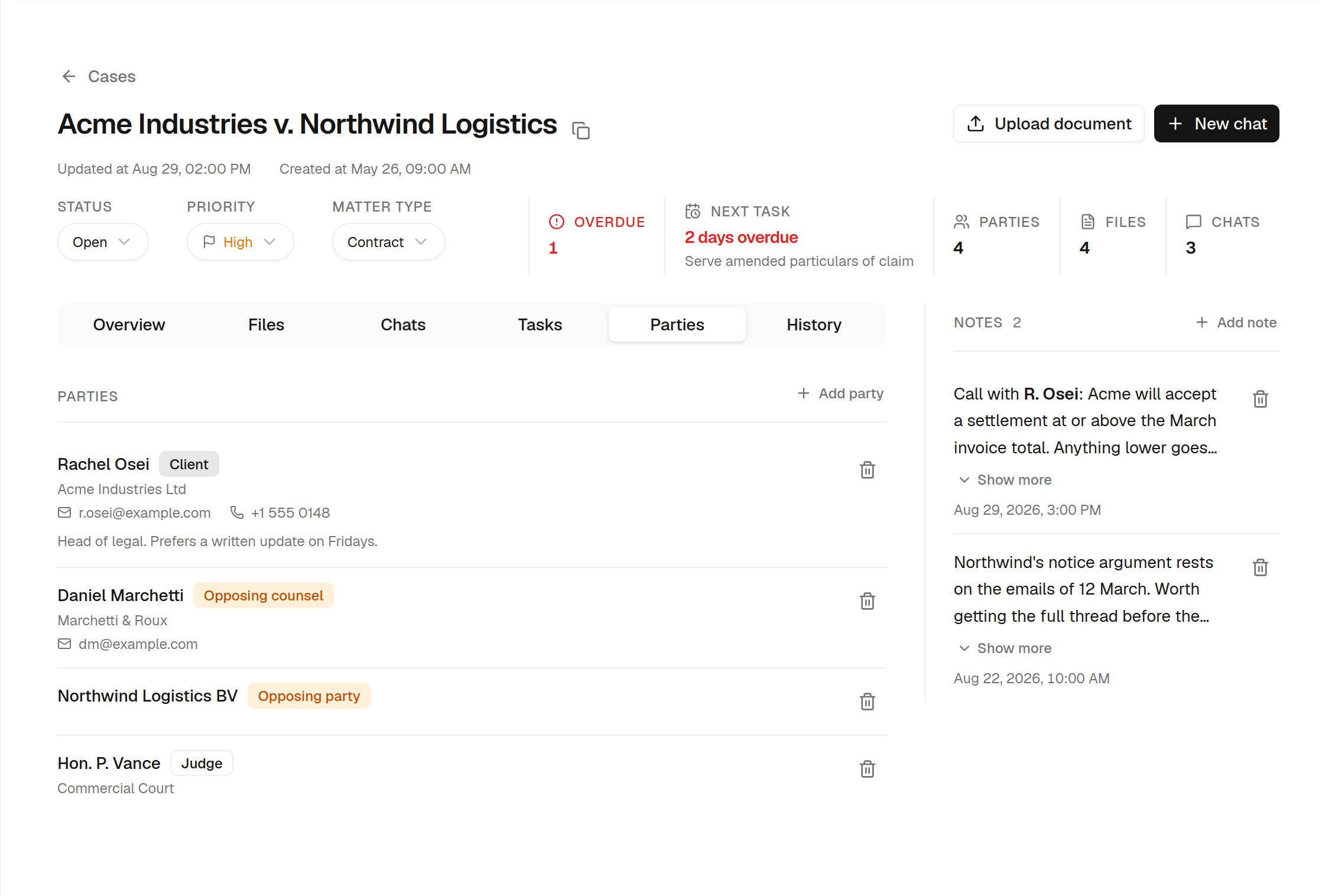
Who is on the file, and who they are
Every name on the matter carries a typed role rather than a free-text label — which is what makes the conflict check worth running.
- Clients, opposing counsel, opposing parties, judges, witnesses and experts
- Party names are compared against every other matter in your account
- Only party-side roles count — a shared judge or clerk is normal, not a conflict
- Names are normalised before comparison, so spacing and case don't hide a match
- A match is a prompt to check, never a verdict that a conflict exists
A record that cannot be edited
Every change to the matter is written to an append-only record — status moves, new parties, filed deadlines, uploaded documents. There is no update policy and no delete policy on that table, so nothing on it can be rewritten after the fact.
Append-only
The history table has insert and select policies and nothing else. There is no code path that edits or deletes a past entry.
Reads in your language
Entries store a key and a payload rather than a frozen English sentence, so the timeline renders correctly in any locale.
Never blocks your work
History writes are fire-and-forget. A failure is logged, never thrown — the record is valuable, but not worth failing your actual operation over.
The assistant doesn’t sit beside the matter. It works inside it.
Most legal case management programs store the matter and stop there — the AI, if there is any, sits in a side panel and knows nothing about the case you have open. Open a chat inside a matter here and the assistant is handed tools that reach that matter: it can read the record before answering, and write to it when you ask.
list_case_deadlinesread 5read the record before answeringOne item is overdue: Serve amended particulars of claim, two days past its 28 August date. Everything else on the matter is future-dated.
Fourteen days from those going out on 3 September is Thursday 17 September 2026 — I have resolved that rather than assuming. Filing it now:
create_case_deadlineIt cannot reach another client’s matter
The case is fixed when those tools are built, and not one of them accepts a case identifier as an argument — so there is no parameter through which the model could name a different matter, even if it tried. There is a test asserting no tool exposes a case-id-shaped input. Every write also goes through your own database session, so row-level security applies as a second layer.
Weighted toward not acting
These tools change a practising lawyer’s real docket, so a wrong call costs more than a missing one. The assistant is instructed to read before asking, never invent a date, resolve relative dates and state the resolved date back to you, ask when an instruction is ambiguous, say what it did after a write, and never report a failed write as done.
What this is not
Every vendor in this category has a feature matrix with ticks all the way down. Here is the honest version, so you can rule us out in two minutes instead of two weeks.
Multi-user firm accounts
Cases are single-user. There is no shared inbox, no assigning work to a colleague, and no firm-wide view. Everyone works in their own account.
Time tracking and billing
Not here. It is a large surface area that competes with dedicated tools rather than with the research and drafting this is actually good at.
Client portal
There is no secure client-facing messaging or document exchange — that needs an external-user login model that does not exist in the product.
Document version control
Re-uploading a file creates a second entry. History records who added what and when, but there is no diff and no revision chain.
If you need firm-wide billing and a client portal, buy a full practice management suite — you will be happier. If what actually eats your week is reading the file, chasing the dates and writing the first draft, that is the part this was built for.
Case management is on the Business plan
Everything else — unlimited Q&A, document review, drafting — is available lower down. Cases, with the matter workspace, the calendar and the deadline digest, needs Business. No seat minimum, and no per-user maths.
Free
Try the assistant on your own questions.
Free forever. No card required.
- 3 legal questions per day
- File uploads up to 1MB (3 per message)
- Case law search access
Starter
Unlimited Q&A for a solo practitioner.
- Unlimited legal Q&A
- 5 deep reasoning requests/day
- 10 document reviews/month
- 10 document generations/month
- File uploads up to 10MB (5 per message)
- Case law search access
- Email support
Pro
For a steady document load.
- Everything in Starter
- 15 deep reasoning requests/day
- 50 document reviews/month
- 50 document generations/month
- File uploads up to 25MB (10 per message)
- Priority email support
Business
The plan that includes case management.
- Everything in Pro
- Cases: shared chats, documents & matter context
- 30 deep reasoning requests/day
- Unlimited document reviews
- Unlimited document generations
- File uploads up to 50MB, unlimited attachments
- Real-time web search
- Dedicated live chat support
Cancel anytime. Secure payment byDodo Payments